Download
macOS · Apple Silicon · MLX

Local AI on your Mac, tuned and running.

aituner finds the models that fit your Mac, runs them on the GPU with MLX, connects your editor, and shows exactly what the hardware is doing. A native Mac app. Nothing leaves your machine.

$ brew install --cask tonynv/tap/aituner

macOS 14+ · M1 or newer · Signed and notarized

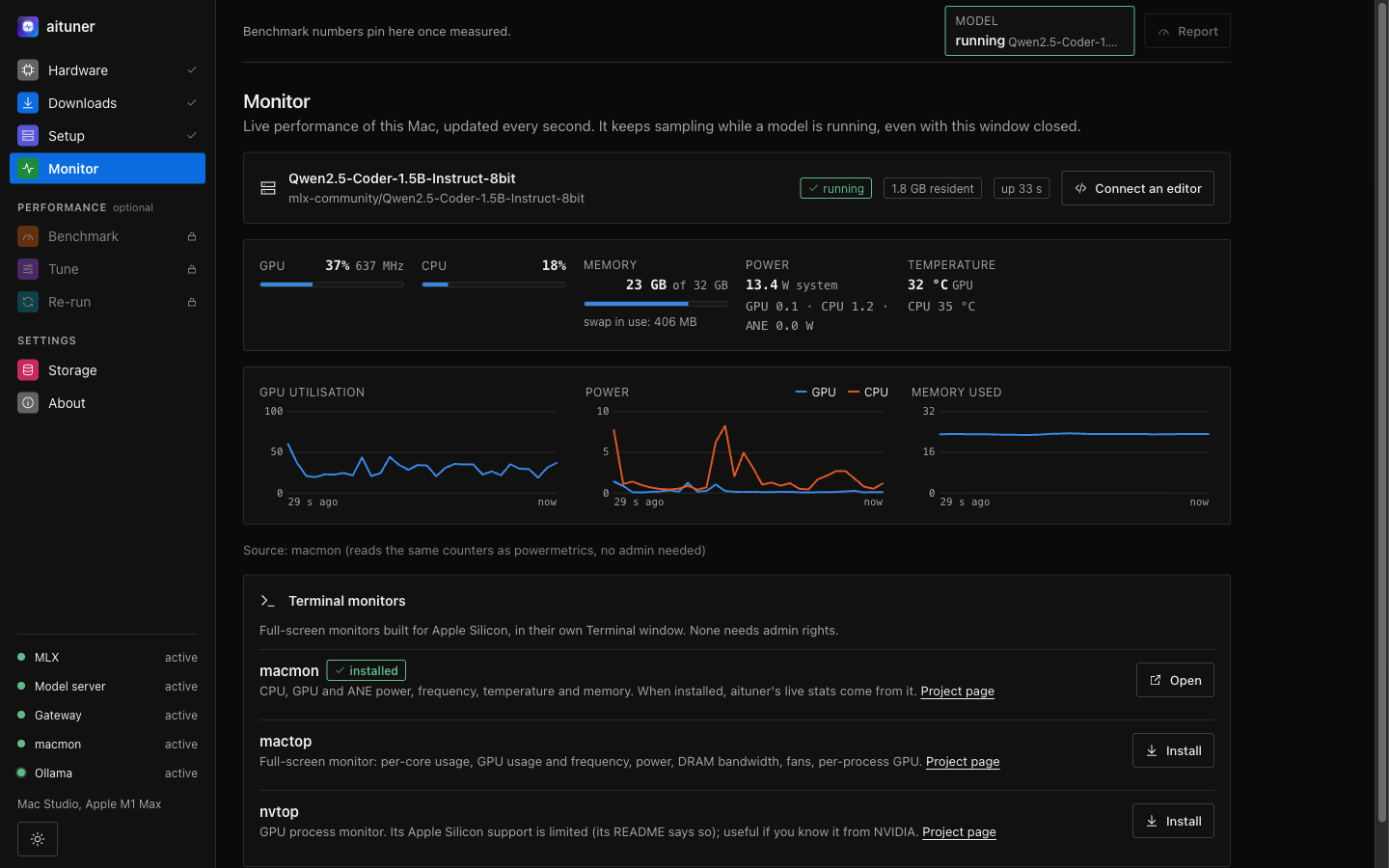
aituner's Monitor showing a Qwen coding model running, with live GPU, CPU, memory, power and temperature
Works with
  • Claude Code
  • VS Code
  • Neovim
  • Vim + tmux
  • Any OpenAI-compatible tool
Features

From a fresh Mac to a model in your editor.

aituner measures instead of guessing, asks before it changes anything, and keeps every step visible.

01 — Scan

Knows your Mac, precisely

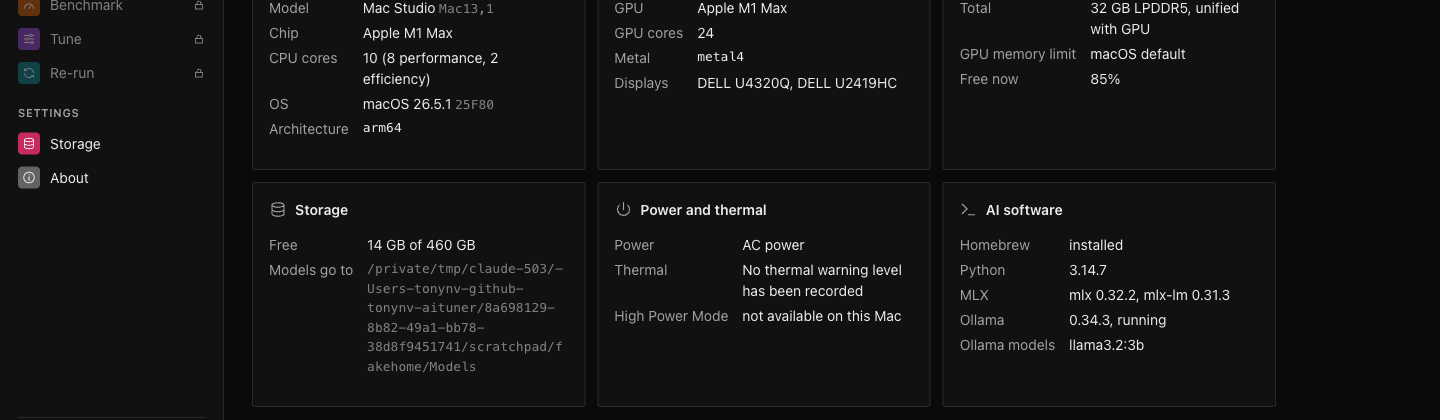
Every launch opens with a live scan of the real machine: chip, CPU and GPU cores, unified memory, storage, power, thermals and installed runtimes.

  • Read directly from macOS, every time
  • The GPU memory budget models can really use
  • Each detection command shown with its timing
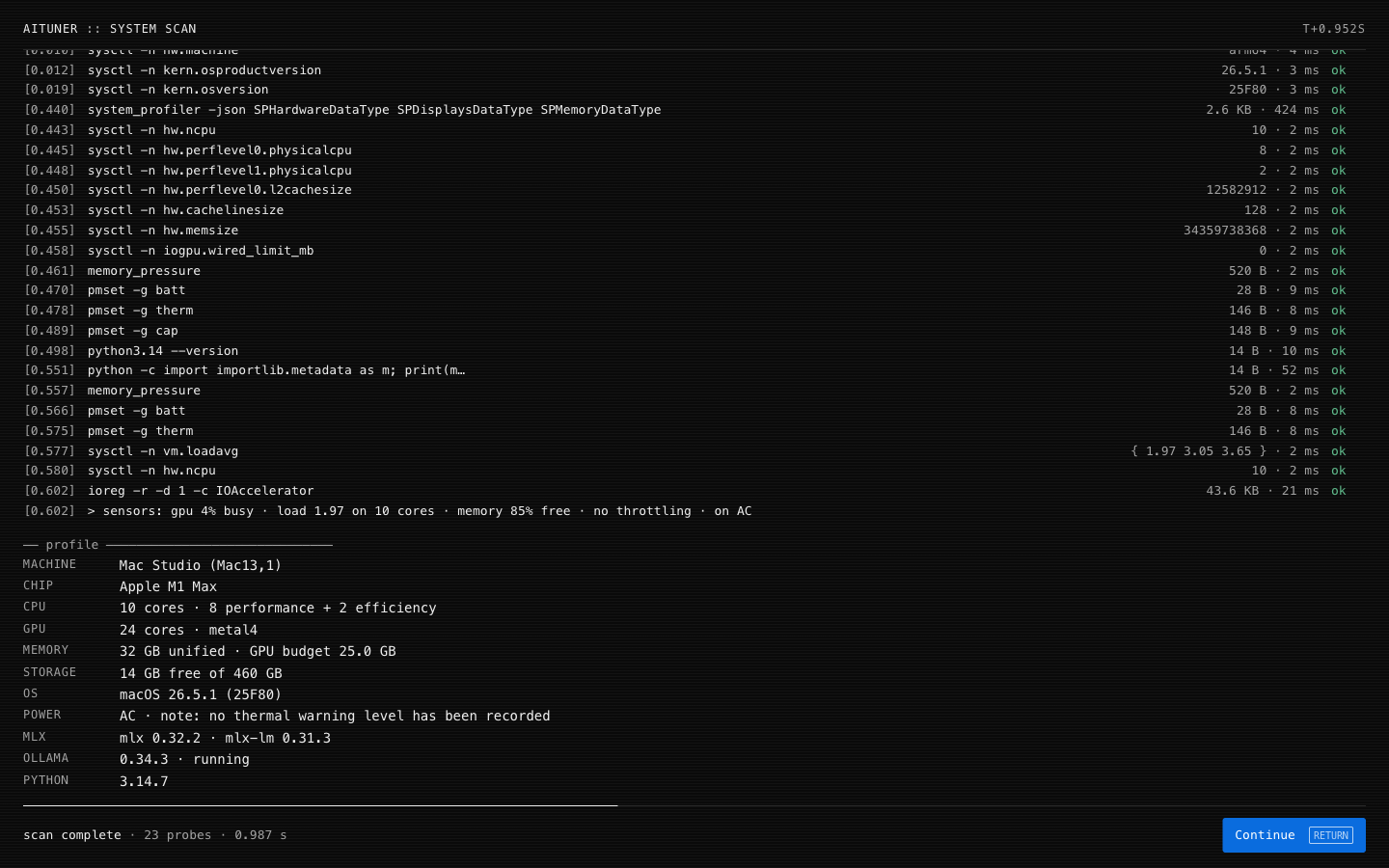
aituner's start-up scan listing each detection command with its timing, then the machine profile
02 — Models

Models that actually fit

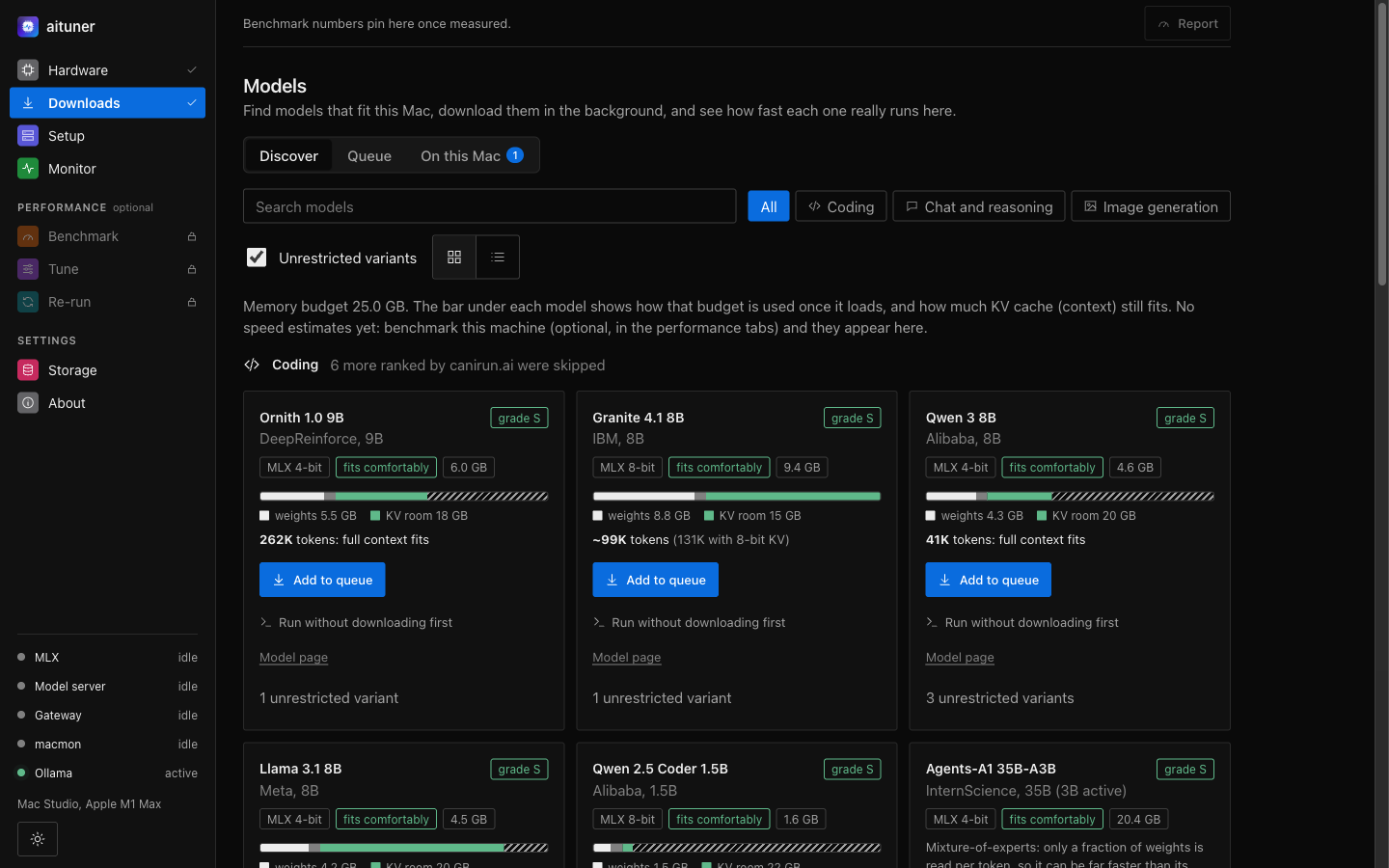
Ranked by canirun.ai, resolved to Apple Silicon MLX builds on Hugging Face, and sized against your memory budget: the weights, the runtime and the context that still fits, before you download.

  • Coding, chat and image models
  • A background queue, verified and resumable
  • Reading and writing speed measured on your Mac
aituner's model catalog with categories, fit grades and a memory bar for each model
03 — Editors

Your editor, connected in one step

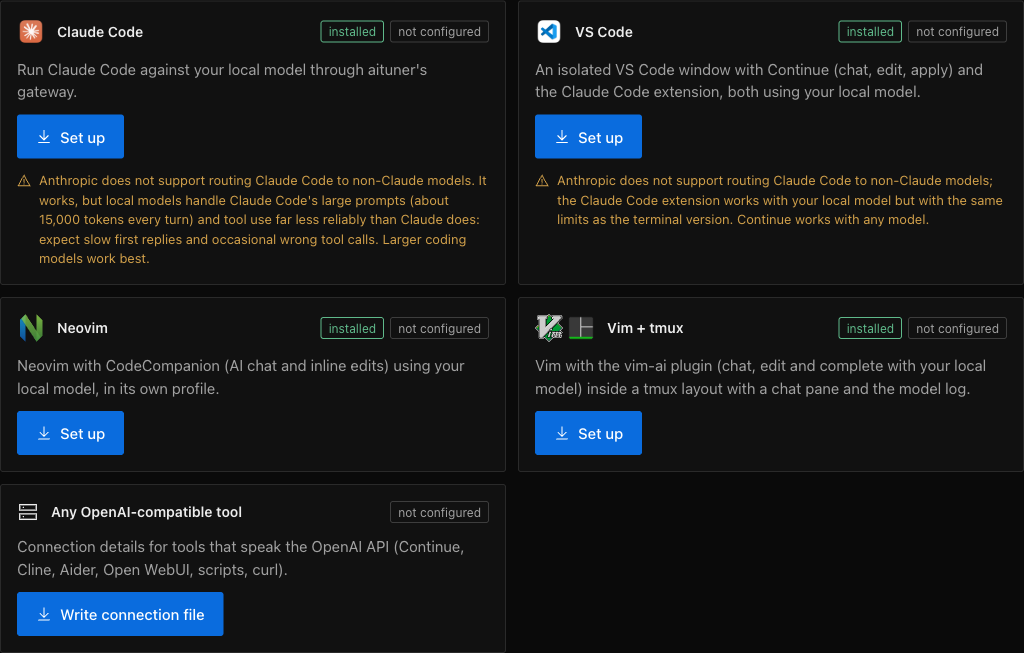
Choose a tool and aituner shows exactly what it will install and change, asks once, then sets it up with its own isolated profile. A local gateway speaks the OpenAI and Anthropic Messages APIs.

  • Claude Code, VS Code, Neovim, Vim + tmux
  • Your own editor settings are never modified
  • Tool calls repaired for Llama, Qwen and gpt-oss
aituner's editor integrations for Claude Code, VS Code, Neovim, Vim and tmux, and OpenAI-compatible tools

Live GPU monitor

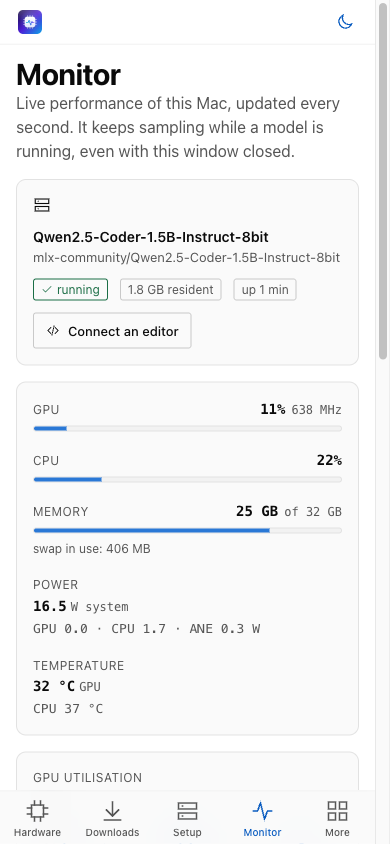
GPU use and frequency, power, temperatures and memory every second, and a menu bar panel with the live model.

Bootstrap in one step

Creates your folders and installs MLX and the live-stats tool after one confirmation, shown as it runs.

Benchmark and tune

Measure bandwidth, compute and model speed, review each system change before it is applied, compare before and after.

Your storage, your rules

Keep models, reports and the knowledge base anywhere, including a NAS, and clear what aituner created with a preview.

Verified updates

New versions are checked against their Developer ID signature, Apple notarization and checksums before they install.

Private by design

Runs on 127.0.0.1 only with a per-launch key. No account, no telemetry; your prompts never leave your Mac.

How it works

Four steps, about ten minutes.

Most of it is the model download.

  1. ScanOpen aituner. It detects your Mac and shows what it can run.
  2. BootstrapOne step creates your folders and installs MLX, after you confirm.
  3. Pick a modelChoose from models sized for your memory; it downloads in the background.
  4. CodeStart it, connect your editor, and watch the GPU on Monitor.
aituner's Hardware page for a Mac Studio with Apple M1 Max
aituner's Monitor at phone size in light mode
Privacy

Your Mac, your models, your call.

Nothing leaves your MacModels run locally. aituner talks only to canirun.ai and Hugging Face for model data, and to GitHub for updates.
Nothing changes without youEvery install and system change shows what it does and waits for your confirmation. Tuning changes can be reverted.
Locked down by defaultLocal only, a single-use launch link, a strict content policy, and downloads limited to model weights, never code.
FAQ

Questions

Which Macs does aituner support?

Apple Silicon Macs (M1 and later) running macOS 14 or later. aituner runs models with MLX on the Apple GPU through Metal, which Intel Macs do not have.

Does aituner send my prompts or code anywhere?

No. Models run on your Mac. aituner only contacts canirun.ai and Hugging Face for model information and the files of the model you choose, and GitHub to check for updates. There is no account and no telemetry.

Which editors and tools work with aituner?

Claude Code, VS Code (with Continue and the Claude Code extension), Neovim, Vim with tmux, and any tool that speaks the OpenAI API, through aituner's local gateway. Each gets its own profile, so your own settings are not changed. Editors in detail.

How does aituner choose models?

It ranks models with canirun.ai, finds their Apple Silicon (MLX) builds on Hugging Face, and sizes each against your Mac's real GPU memory budget, showing the weights, the runtime and how much context still fits. More on models.

Does aituner need Ollama?

No. aituner runs models with MLX, which is built for Apple Silicon. If Ollama is already installed it can be used as a comparison, and aituner can quit or remove it for you.

How is aituner updated?

aituner checks GitHub for new releases, asks before updating, verifies the download (Developer ID signature, Apple notarization, checksums) and restarts. Homebrew installs update with brew. How updates work.

Download

Put your Mac to work.

For Apple Silicon Macs running macOS 14 or later.